
Hands-On: Running AEM Dispatcher on Apache 2.2 (Legacy 6.5 Local Setup)
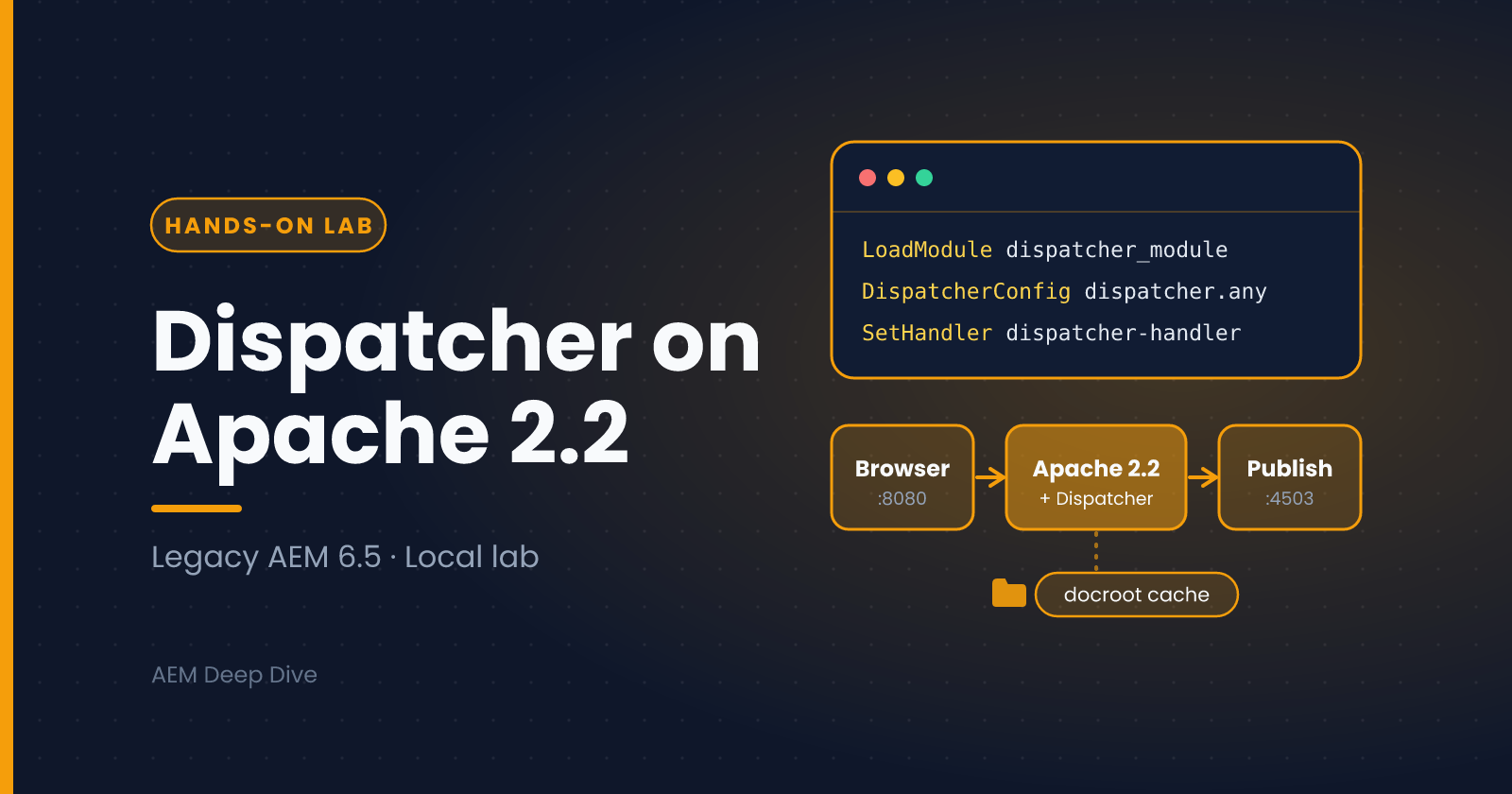
A standalone hands-on lab. Companion to the Dispatcher Caching & Invalidation post.
In Dispatcher Caching & Invalidation we looked at how the Dispatcher cache works: what gets cached, how /statfileslevel and /invalidate decide what becomes stale, and why a page can look fresh in one layer and old in another. Reading about it only goes so far. This lab lets you run a Dispatcher on your own machine and watch it happen.
This guide uses Apache HTTP Server 2.2, which is what some long-running AEM 6.x environments still use. It's meant for cases where you need to replicate an existing 2.2-based stack.
Which Setup Should You Use?
| Your situation | What to use |
|---|---|
| AEM as a Cloud Service | The Dispatcher SDK, which runs the Dispatcher in Docker and validates your configuration. This guide is not for you |
| AEM 6.5 with a new or flexible setup | A current Dispatcher module for Apache 2.4 |
| A legacy 6.x stack that runs Apache 2.2 and you need to match it locally | This guide |
Before you start:
- Apache 2.2 no longer receives security fixes. Run this on your own machine only (
localhost), never on a network-facing server.- Dispatcher module availability. Adobe's current Dispatcher downloads are built for Apache 2.4 (and IIS). Modules for Apache 2.2 belong to older Dispatcher releases, so you'll need an older package that you already have access to. If you can't get one, run the same lab with Apache 2.4 and a current Dispatcher: the concepts, the farm file and the cache behavior are the same, and only the module name and a few
httpd.confdetails differ.
Prerequisites
Before you start, make sure you have:
- A running local AEM Publish instance, typically on port
4503(Author on4502works for testing, but caching is normally set up in front of Publish) - Apache HTTP Server 2.2 installed
- The AEM Dispatcher module package for Apache 2.2 (downloaded from Adobe Software Distribution, which needs an Adobe account with AEM entitlements, and see the availability note above)
- Basic familiarity with editing
httpd.conf
Windows users: use forward slashes in Apache and Dispatcher paths (for example
C:/apache2.2/htdocs), and replace the/tmp/...and/path/to/...examples below with real folders on your machine.
Step 1: Verify Your Apache Installation
Confirm Apache 2.2 is installed and check whether it's 32-bit or 64-bit, since the Dispatcher module must match:
httpd -v
httpd -V | grep -i "architecture"
You'll need this info to pick the correct Dispatcher binary in the next step.
Step 2: Download and Place the Dispatcher Module
From the Dispatcher package you downloaded, locate the module file matching your OS and Apache version:
- Windows:
dispatcher-apache2.2-x86_64-<version>.so(or 32-bit equivalent ex: disp_apache2.2.dll) - Linux:
dispatcher-apache2.2-x86_64-<version>.so - macOS:
dispatcher-apache2.2-x86_64-<version>.so
Copy this file into your Apache modules directory and rename it for clarity:
cp dispatcher-apache2.2-x86_64-<version>.so /path/to/apache2.2/modules/mod_dispatcher.so
Can't find a 2.2 module? See the availability note at the top. Don't rename an Apache 2.4 module and try to load it in 2.2, because the two versions are not compatible and Apache will fail to start.
Step 3: Load the Module in httpd.conf
Open your Apache configuration file (conf/httpd.conf) and add the following line, ideally near the other LoadModule directives:
LoadModule dispatcher_module modules/mod_dispatcher.so
Step 4: Create the Dispatcher Configuration Directory
Create a folder to hold your Dispatcher configuration files, e.g.:
mkdir /path/to/apache2.2/conf/dispatcher
Inside this folder, you'll typically create:
dispatcher.any— main dispatcher configavailable_farms/— folder holding one.anyfile per "farm" (site)cache/— local disk cache directory used by Dispatcher
Step 5: Configure the Dispatcher Module in httpd.conf
Add the following block to httpd.conf to point Apache at your Dispatcher config and enable the handler:
<IfModule disp_apache2.c>
    DispatcherConfig conf/dispatcher/dispatcher.any
    DispatcherLog logs/dispatcher.log
    DispatcherLogLevel 3
    DispatcherNoServerHeader Off
    DispatcherDeclineRoot Off
    DispatcherUseProcessedURL Off
    DispatcherPassError 0
</IfModule>

<LocationMatch "^/(.*)">
    SetHandler dispatcher-handler
</LocationMatch>
Step 6: Create the Main dispatcher.any File
Inside conf/dispatcher/dispatcher.any, reference your farm file(s):
/farms
{
  $include "available_farms/*.any"
}
Step 7: Create a Farm Configuration
Create available_farms/localhost.any with a basic farm definition pointing to your local AEM publish instance:
/localhost
{
  /clientheaders
  {
    "*"
  }

  /virtualhosts
  {
    "localhost"
  }

  /renders
  {
    /rend01
    {
      /hostname "localhost"
      /port "4503"
    }
  }

  /filter
  {
    /0001 { /type "allow" /glob "*" }
  }

  /cache
  {
    /docroot "/path/to/apache2.2/htdocs"
    /rules
    {
      /0000 { /glob "*" /type "allow" }
    }
    /invalidate
    {
      /0000 { /glob "*" /type "deny" }
      /0001 { /glob "*.html" /type "allow" }
    }
    /statfileslevel "3"
    /allowAuthorized "0"
  }

  /statfile "/tmp/dispatcher-localhost.stat"
}
The
/filtersection above is intentionally permissive ("allow" "*") for local testing only. Never use an open filter like this in a staging or production environment — always define explicit allow/deny rules based on Adobe's recommended Dispatcher security checklist.
Here's how each part of the /cache section relates to what you learned in that post:
| Setting | What it does in this lab |
|---|---|
/docroot |
The folder where cached files are written. It must match Apache's DocumentRoot |
/rules |
Allows everything to be cached. This is fine locally, but production farms use stricter rules |
/invalidate |
After an activation, only .html files become stale, while images, CSS and JS stay cached |
/statfileslevel "3" |
An activation invalidates the content below the folder three levels deep, as covered in that post. Lower numbers invalidate more |
/allowAuthorized "0" |
Requests that carry authentication are not cached |
Step 8: Set Up the Document Root
Make sure the docroot path in your farm config exists and matches Apache's DocumentRoot directive in httpd.conf:
DocumentRoot "/path/to/apache2.2/htdocs"
<Directory "/path/to/apache2.2/htdocs">
    Options Indexes FollowSymLinks
    AllowOverride None
    Order allow,deny
    Allow from all
</Directory>
Step 9: Set Apache to Listen on the Right Port
By default, Apache listens on port 80. For local testing, this is usually fine, but if port 80 is taken, change it:
Listen 8080
Step 10: Restart Apache and Test
Restart Apache:
# Linux/macOS
sudo apachectl restart

# Windows (from Apache bin directory)
httpd.exe -k restart
Then hit your site through Apache (not directly through AEM's port):
http://localhost:8080/
If everything's wired correctly, you should see your AEM publish instance's content served through Apache/Dispatcher.
Step 11: Verify Caching Is Working
Check the docroot folder you configured. After a successful request, Dispatcher should write a static cached copy of the page (for example an .html file) into that directory. You can also tail the Dispatcher log to confirm requests are being processed:
tail -f /path/to/apache2.2/logs/dispatcher.log
On Windows, open the same dispatcher.log file in a text editor that refreshes, or use Get-Content -Wait in PowerShell.
Lab: See the Cache Work
Now connect this to the caching theory. These short experiments show the cache behavior you read about.
1. Cache hit versus miss
- Request a page through Apache, for example
http://localhost:8080/content/<your-site>/en/home.html - Look in the
docrootfolder. A new file mirroring that path should appear - Request the same page again. This time Dispatcher serves the file from disk and doesn't need Publish. If you stop your Publish instance, a page that's already cached still loads, while an uncached page fails
2. What isn't cached
- Request the same page with a query string, for example
...home.html?test=1 - No new file is written, because requests with query strings aren't cached by default (this is what
/ignoreUrlParamsis for)
3. Simulate an invalidation (optional)
Normally a flush request arrives from Publish after content is activated. You can send one by hand to see how invalidation behaves:
curl -X POST http://localhost:8080/dispatcher/invalidate.cache \
  -H "CQ-Action: Activate" \
  -H "CQ-Handle: /content/<your-site>/en/home" \
  -H "Content-Length: 0" \
  -H "Content-Type: application/octet-stream"
Afterwards, look for .stat files in the docroot folders. The cached .html files are now treated as stale, and the next request fetches a fresh copy from Publish. If the request is rejected, your Dispatcher version may restrict who can send flush requests. Check the Dispatcher documentation for the /allowedClients setting.
Try changing /statfileslevel and repeating the experiment to see how much of the cache each level invalidates.
Common Issues & Fixes
- Apache fails to start after adding the module. Usually an architecture mismatch (32-bit module on a 64-bit Apache, or vice versa), or a module built for a different Apache version. Re-check
httpd -V - Blank page or 404 through Apache. Double-check that the
/rendershostname and port match your actual AEM Publish instance, and that AEM is running - Nothing gets cached. Verify the
docrootpath is writable by the user running Apache, and that your/cache/rulesaren't blocking the request path. Remember that requests with query strings aren't cached by default - Changes to
dispatcher.anynot taking effect. Dispatcher config is only re-read on Apache restart, not on every request. Always restart Apache after editing.anyfiles - Paths fail on Windows. Use forward slashes and real folders instead of the
/tmpand/path/toplaceholders - The flush request is rejected. Check the flush endpoint path, that your
/virtualhostsentry matches the host you're calling, and your Dispatcher version's rules for allowed flush clients
Wrapping Up
This setup mirrors, at a smaller scale, how the Dispatcher works in real deployments: caching pages, applying filters and routing requests to a render instance. Watching the cache files appear and go stale makes the ideas from the caching post concrete, and it makes Dispatcher problems much easier to debug in staging or production, where you often don't have direct server access.
Two reminders before you move on:
- The
/filtersection in this lab is deliberately open. Real farms need explicit allow and deny rules - On AEM as a Cloud Service, use the Dispatcher SDK and its validator instead of building your own Apache stack. We compare the two models in AEM as a Cloud Service vs AEM 6.5
Related Reading
- Dispatcher Caching & Invalidation: the theory behind what you just tested
- Troubleshooting Replication: how content reaches Publish before the Dispatcher caches it
- AEM as a Cloud Service vs AEM 6.5: how the Dispatcher setup differs on Cloud Service
- AEM Architecture: Author, Publish and Dispatcher: the big picture
This guide is for learning and for matching legacy environments. It isn't a production hardening guide, and the open /filter above must be replaced with explicit rules before any real use.
About the author
- AEM Technical Lead experienced with building and architecting solutions on AEM Sites and Assets. Sharing practical tutorials, real-world implementation lessons, and best practices to help fellow developers and leads navigate AEM.
Comments
Join the discussionDid the lab work on your setup? If you had to adapt it for Windows or Apache 2.4, share what you changed so other readers can benefit. Please leave out any internal hostnames or credentials.