
Dispatcher Caching & Invalidation
Series: AEM Architecture & Operations — Part 1
In the Foundations series we met the Dispatcher as the caching and security layer in front of Publish. In production it is the single biggest factor in how fast your site feels and how much load Publish carries. It's also the source of the most common production complaint in AEM: "I published the change, but the site still shows the old content." This post explains how Dispatcher caching works, how invalidation works, and how to configure and debug both.
How the Dispatcher Cache Works
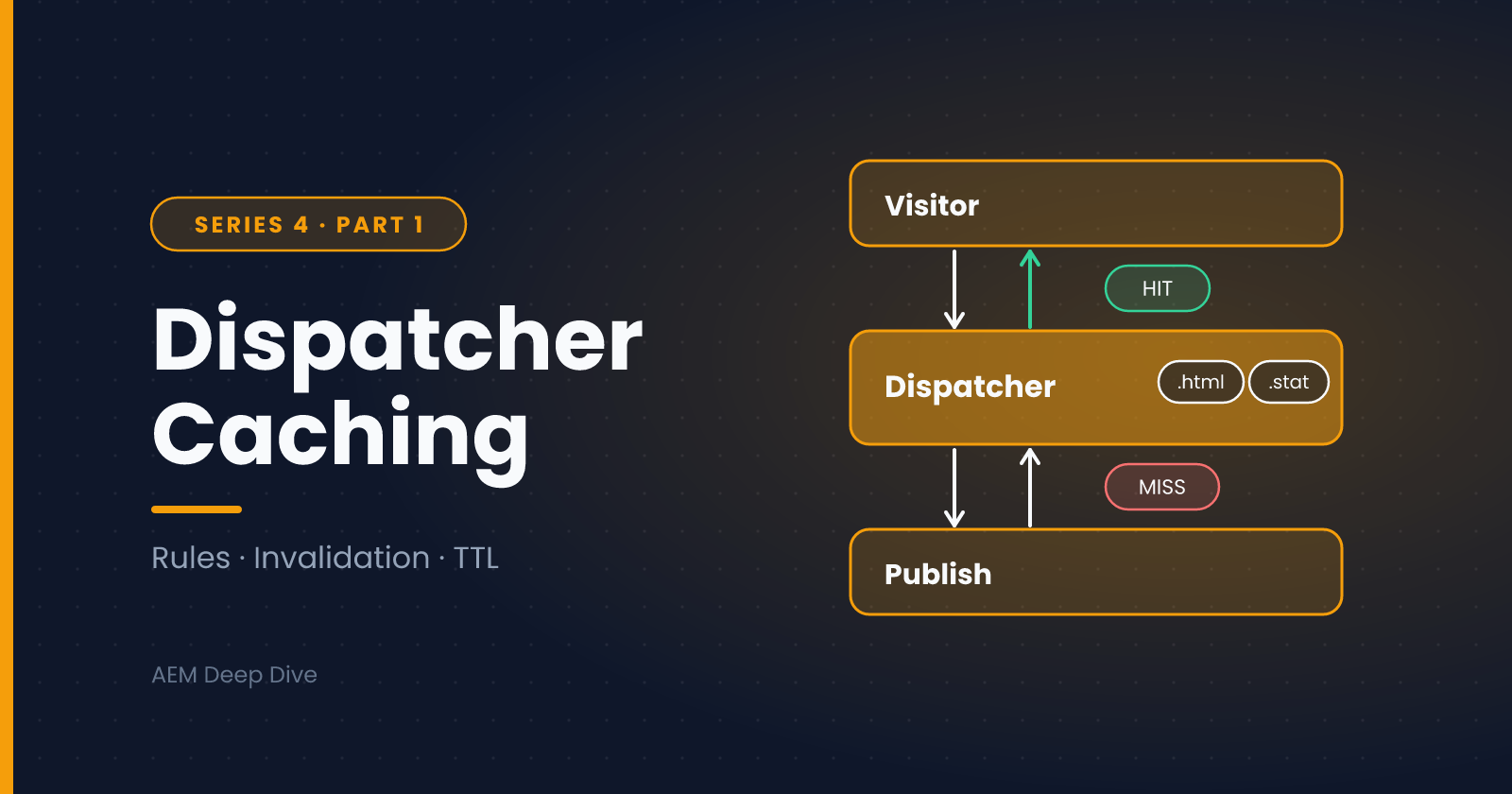
The Dispatcher cache is file-based. When a request arrives:
- Dispatcher checks whether it may cache the request
- If a valid cached file exists in its docroot, it serves the file directly and Publish never sees the request
- If not, it forwards the request to Publish, and if the response is cacheable it saves the response as a file that mirrors the URL path
So /content/mysite/en/home.html becomes a file at <docroot>/content/mysite/en/home.html.
What Dispatcher Will and Won't Cache
By default, Dispatcher caches a response only when all of these are true:
- The request is a GET (or HEAD)
- The URL has a file extension (
.html,.json,.cssand so on) - The URL has no query string (unless you configure
/ignoreUrlParams) - The response status is 200
- The request isn't authenticated, unless you enable
/allowAuthorized - The response doesn't carry headers that forbid caching, such as
Dispatcher: no-cache,Cache-Control: no-cacheorprivate, orPragma: no-cache - The path isn't denied by your cache rules
Knowing this list solves a large share of "why isn't this cached?" questions.
The Key Configuration Pieces
In a classic (6.5) Dispatcher farm file, the /cache section holds the important settings:
/cache
  {
  /docroot "/opt/dispatcher/cache"
  /statfileslevel "3"
  /allowAuthorized "0"
  /enableTTL "1"

  /rules
    {
    /0000 { /glob "*" /type "allow" }
    /0001 { /glob "/content/mysite/*/account/*" /type "deny" }
    }

  /invalidate
    {
    /0000 { /glob "*" /type "deny" }
    /0001 { /glob "*.html" /type "allow" }
    }

  /ignoreUrlParams
    {
    /0001 { /glob "*" /type "deny" }
    /0002 { /glob "utm_*" /type "allow" }
    }
  }
What each does:
| Setting | Purpose |
|---|---|
/docroot |
Where cached files are stored |
/statfileslevel |
How granular invalidation is (explained below) |
/rules |
Which paths and file types may be cached |
/invalidate |
Which cached files become stale when something changes |
/ignoreUrlParams |
Which query parameters can be ignored so the page is still cached |
/enableTTL |
Lets cached files expire based on Cache-Control / Expires headers from Publish |
/allowAuthorized |
Whether authenticated requests may be cached (usually off) |
Query Parameters and Cache Hit Ratio
Marketing links like ?utm_source=email make every URL "unique", so each one bypasses the cache. The recommended pattern is an allow-list of ignorable parameters: deny everything, then allow only parameters that never change the content, such as utm_*. In /ignoreUrlParams, an allow rule means "ignore this parameter when deciding whether to cache."
Be careful with the shortcut of allowing *: it would cache one version of a page for every parameter value, including ones that really do change the output (like ?page=2).
How Invalidation Works
Dispatcher doesn't usually delete cached files when content changes. Instead it uses .stat files:
- When an author activates a page, a flush request reaches Dispatcher
- Dispatcher touches a
.statfile at a certain directory level - For any cached file, if the
.statfile is newer than the cached file, Dispatcher treats the cached file as stale and fetches a fresh copy from Publish on the next request
Only files that match the /invalidate rules are affected, which is why static files (images, CSS, JS) usually survive an activation while HTML is refreshed.
Understanding /statfileslevel
/statfileslevel decides how much of the cache one activation invalidates. When a file is updated, Dispatcher finds the folder at the configured level and invalidates everything in and below it.
For a typical multi-brand, multi-country, multi-language structure like /content/brand/country/language/...:
/statfileslevel |
Effect of an activation |
|---|---|
0 |
Invalidates the whole docroot |
1 |
Invalidates per brand (/content/brand) |
2 |
Invalidates per country |
3 |
Invalidates per language |
Pick the level that matches how your content tree is organized. Too low a number and a single edit flushes far more than necessary (hurting performance on busy sites). Too high a number and related pages, such as navigation that appears on every page, may not be refreshed when you expect.
Delete vs Invalidate
A flush request carries an action:
- Activate: invalidate, by touching the
.statfile - Delete/Deactivate: remove the cached file for the specific path, as well as invalidating
If you want "refresh now" behavior for one resource, a delete flush on that path is the most direct.
Time-Based Invalidation (TTL)
With /enableTTL "1", Dispatcher honors Cache-Control: max-age and Expires headers on responses. A file expires when its TTL passes, even if no activation happened. This is useful for content that changes without being activated, such as feeds, listings or anything driven by external data. Set the headers from Apache (mod_headers) or from your Publish responses.
Who Sends the Flush Request?
On AEM 6.5 or AMS: a Dispatcher Flush replication agent configured on Publish sends an HTTP request to the Dispatcher's /dispatcher/invalidate.cache endpoint after content is replicated. The request carries headers such as CQ-Action, CQ-Handle and Content-Length. The Dispatcher's allowed-clients configuration decides who may send flush requests.
On AEM as a Cloud Service: invalidation is wired up for you. Activating content triggers invalidation automatically, and the Dispatcher configuration you deploy through Cloud Manager includes the flush plumbing. A CDN also sits in front of Dispatcher, so you now have two caches to think about (covered below).
Dispatcher on AEM as a Cloud Service
Cloud Service projects include a dispatcher module based on the Dispatcher SDK. Key differences from a 6.5 setup:
- The configuration is split into folders such as
conf.d(Apache) andconf.dispatcher.d(Dispatcher), with sub-folders foravailable_farms,cache,filters,clientheaders,rendersandvirtualhosts - Some files are immutable: Adobe controls them, and the validator rejects changes. A common example is
default_invalidate.any - You validate your configuration locally before deploying, with the SDK's validator
- You can run Dispatcher locally in Docker to test rules and caching before they reach a real environment
Typical commands (from the SDK folder):
# Validate your configuration
./bin/validator full -d out src

# Run Dispatcher locally against your local AEM Publish
./bin/docker_run.sh out host.docker.internal:4503 8080
Script names and arguments can change between SDK versions, so check the README that ships with your SDK download.
Local testing gotcha: because of the immutable files, a local Dispatcher may not behave exactly like a cloud environment for flush testing. If invalidation looks broken locally (for example, the log says a file was "never flushed" or no .stat files appear), confirm the behavior on a cloud Dev environment before assuming your config is wrong.
The CDN Layer
On Cloud Service, a CDN caches in front of Dispatcher. That means:
- Cache-Control headers you set matter twice: they influence the CDN and, with TTL enabled, Dispatcher
- Invalidating Dispatcher does not instantly purge the CDN. A page can be fresh in Dispatcher but stale at the edge until its TTL passes or it is purged
- Set sensible TTLs per content type (short for HTML, long for versioned clientlibs and images) and plan how you will purge in an emergency. Check Adobe's current documentation for the supported purge options
Debugging Stale Content
When "my change isn't showing", work from the user's browser inward:
- Browser: hard refresh, or test in a private window, to rule out browser caching
- CDN (Cloud Service): inspect response headers (
curl -I https://yoursite/page.html) and look atAgeandCache-Control - Dispatcher: check whether the cached file exists and its timestamp, and compare it with the
.statfile at your/statfileslevelfolder - Publish: request the page directly from Publish, bypassing Dispatcher. If it's wrong here, the problem is replication, not caching
- Author: confirm the page was actually published, and wasn't just saved
Other things to check:
- Was a flush sent? Look in the flush agent log (6.5) or the Dispatcher log
- Does the path match an
/invalidaterule? A.jsonor.xmlfile won't be invalidated if only*.htmlis allowed - Is
/statfilesleveltoo deep or too shallow for the pages that changed? Shared components, like a header, live in a different folder from the page that changed - Did Publish send
no-cacheheaders, making files uncacheable in the first place?
Temporarily raise the Dispatcher log level to see per-request decisions (why a request wasn't cached, which .stat file applied). Lower it again afterward, since debug logging is noisy.
Best Practices
- Cache as much as possible, and treat every uncacheable page as a deliberate decision
- Pick
/statfileslevelto match your content tree, and keep the tree consistent - Use an allow-list for ignorable query parameters
- Keep personalized content out of cached HTML, and load it client-side or with Sling Dynamic Include (SDI)
- Use versioned clientlibs so static assets can have long TTLs
- Review
/rulesand/filtertogether, since cache rules decide what's stored and filters decide what's reachable at all - On Cloud Service, validate locally and test on Dev before promoting Dispatcher changes
- Monitor your cache hit ratio. A healthy site serves the vast majority of HTML and assets from cache
What's Next
Dispatcher invalidation depends on content actually reaching Publish. In the next post we look at replication, how content moves from Author to Publish on 6.5 and on Cloud Service, and how to troubleshoot it when it doesn't.
Next in this series: [Troubleshooting Replication Agents]
About the author
- AEM Technical Lead experienced with building and architecting solutions on AEM Sites and Assets. Sharing practical tutorials, real-world implementation lessons, and best practices to help fellow developers and leads navigate AEM.
Comments
Join the discussionWhat's the most stubborn stale-content problem you've hit: Dispatcher, the CDN or something else? Describe what you saw and how you fixed it. Good examples may end up in a future troubleshooting checklist.
AEM Architecture & Operations
"Dispatcher, replication, performance tuning, and cloud vs on-prem decisions — what it takes to run AEM in production."