

Understanding Sling: Resource Resolution & Request Lifecycle
Series: AEM Foundations — Part 4
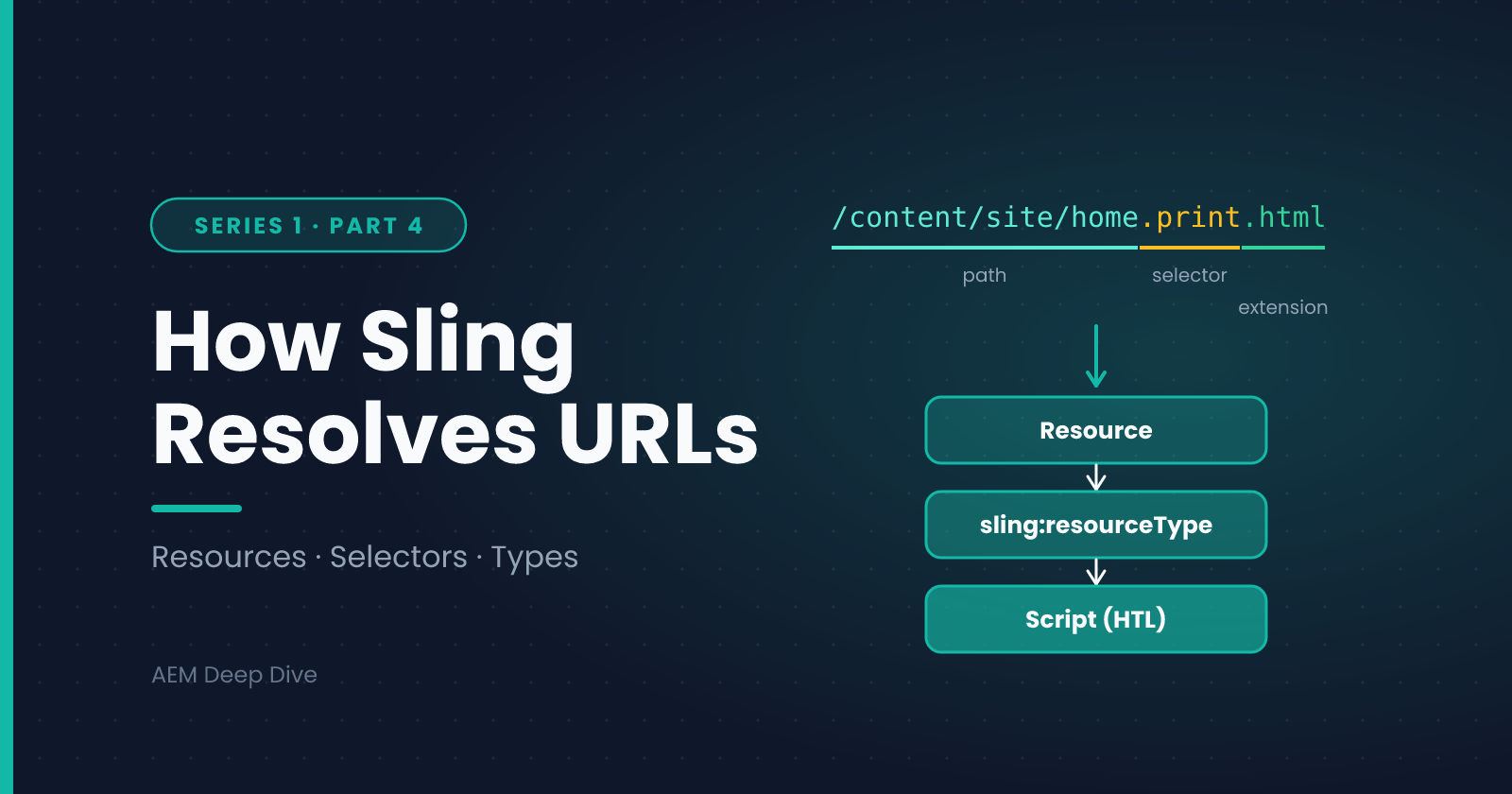
AEM is built on top of Apache Sling, a web framework that takes a fundamentally different approach to handling requests than typical Java web frameworks. If you've worked with Spring MVC or a similar framework, Sling's model will initially feel unusual — there's no central routing table mapping URLs to controllers. Instead, everything revolves around resources.
Everything Is a Resource
In Sling, a "resource" is any node in the JCR repository — a page, a component instance, an asset, a piece of content. Every resource has a path and a resource type, and this pairing is the foundation of how Sling decides what to render.
For example, a page might live at:
/content/mysite/en/home
And a component instance on that page might be:
/content/mysite/en/home/jcr:content/root/container/text
That text component's sling:resourceType property might point to something like mysite/components/text, which tells Sling exactly which script or Java class should render it.
Resource Resolution: How a URL Becomes Content
When a request comes in, Sling doesn't look up a controller — it resolves the resource at that URL path first, then figures out how to render it. The core steps are:
- Strip the request URL down to a repository path (handling extensions and selectors along the way)
- Resolve the resource at that path in the JCR
- Determine the resource's
sling:resourceType - Locate a matching script or Servlet/Sling Model for that resource type, searching in the
/appsoverlay area first, then falling back to/libs - Render using that script
This /apps overlay-first, /libs fallback pattern is core to how AEM customization works — Adobe ships default implementations under /libs, and you customize behavior by placing your own resource type definitions under /apps without ever touching Adobe's shipped code.
Selectors and Extensions
Sling URLs can carry extra information beyond just the path, using selectors and extensions. A URL like:
/content/mysite/en/home.json
requests the JSON rendering of that resource, while:
/content/mysite/en/home.print.html
uses the print selector to request an alternate HTML rendering — useful for rendering the same content differently depending on context (a print-friendly layout, a mobile-specific variant, an API-style JSON output) without duplicating content.
The Sling Request Lifecycle, Step by Step
Putting it together, here's roughly what happens when a browser requests an AEM page:
- The request hits the Dispatcher (if it's a live/Publish request) — see the Architecture post in this series
- If not cached, it reaches the Sling engine inside AEM
- Sling's Resource Resolver maps the URL to a JCR resource path
- Sling determines the resource's type, selectors, and extension
- It locates the appropriate rendering script (HTL/JSP) or Servlet
- If the component uses a Sling Model, Sling instantiates it and injects data from the resource (we'll cover this in detail in the next series)
- The script renders using that data, producing the final HTML/JSON/etc. response
- The response is sent back — and cached by Dispatcher if applicable
Why This Model Matters
Once resource resolution clicks, a lot of AEM customization patterns make immediate sense:
- Overlaying Adobe's default components just means creating a matching path under
/apps— no core code modification needed - Multi-site, multi-language setups work because the same resource type can be reused across different content paths
- Debugging "why isn't my component rendering the way I expect" almost always comes down to checking the resource's actual
sling:resourceTypeand where the resolver is finding (or failing to find) a matching script
What's Next
With resource resolution and the request lifecycle covered, the final post in this series looks at how a real AEM project is organized on disk — the core, ui.apps, ui.content, and other modules you saw generated by the archetype in the previous post.
Next in this series: [AEM Project Structure Explained]
About the author
- AEM Technical Lead experienced with building and architecting solutions on AEM Sites and Assets. Sharing practical tutorials, real-world implementation lessons, and best practices to help fellow developers and leads navigate AEM.
Comments
Join the discussionSling's resource-first model feels unusual if you come from controller-based frameworks. What was your "aha" moment with resource types and selectors, or what's still confusing?
AEM Foundations
"Start here. Core AEM concepts, architecture, and dev environment setup explained clearly for anyone new to Adobe Experience Manager."