
OSGi Services and References: Wiring Your Code Together
Series: AEM Backend Essentials — Part 2
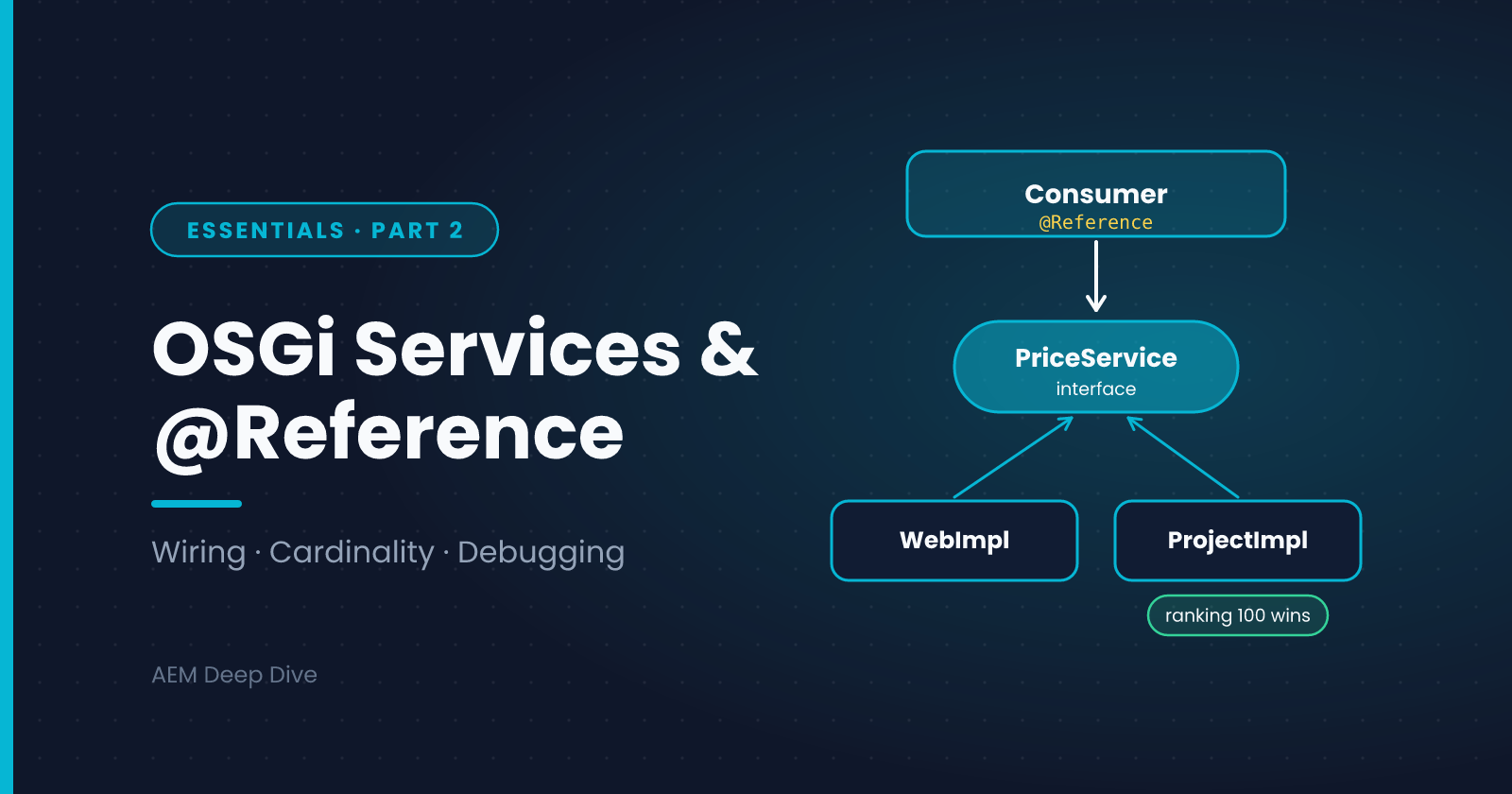
In the previous post we saw how a component starts and stops. Real features need components that work together: a servlet that calls a service, a service that uses another service, a workflow step that needs a helper. OSGi handles this wiring through services and references. This post shows how to design a service, consume it safely, and diagnose it when the wiring fails.
Service = Interface + Implementation
The standard pattern is a small public interface and one implementation:
package com.myproject.core.services;

public interface PriceService {
    String formatPrice(double amount, String currencyCode);
}
package com.myproject.core.services.impl;

import com.myproject.core.services.PriceService;
import java.text.NumberFormat;
import java.util.Currency;
import java.util.Locale;
import org.osgi.service.component.annotations.Component;

@Component(service = PriceService.class)
public class PriceServiceImpl implements PriceService {

    @Override
    public String formatPrice(double amount, String currencyCode) {
        NumberFormat format = NumberFormat.getCurrencyInstance(Locale.US);
        format.setCurrency(Currency.getInstance(currencyCode));
        return format.format(amount);
    }
}
service = PriceService.class is what registers the component as a service under that interface. Without it, the component exists but nobody can look it up.
Keep the interface in an API package and the implementation in a separate impl package. Other code depends only on the interface, so you can replace or mock the implementation without touching callers.
Consuming a Service with @Reference
Inside another component, ask for the service with @Reference:
@Component(service = Servlet.class)
public class PriceServlet extends SlingSafeMethodsServlet {

    @Reference
    private PriceService priceService;

    @Override
    protected void doGet(SlingHttpServletRequest request, SlingHttpServletResponse response)
            throws IOException {
        response.setContentType("text/plain");
        response.getWriter().write(priceService.formatPrice(19.99, "USD"));
    }
}
OSGi finds an active PriceService, injects it, and only then activates the servlet. If no matching service exists, the servlet stays unsatisfied.
In a Sling Model, don't use @Reference. Use @OSGiService:
@Model(adaptables = SlingHttpServletRequest.class,
       defaultInjectionStrategy = DefaultInjectionStrategy.OPTIONAL)
public class PriceModel {
    @OSGiService
    private PriceService priceService;
}
Reference Options That Matter
@Reference has defaults that suit most cases: mandatory, static. These attributes change the behavior:
| Attribute | Values | Meaning |
|---|---|---|
cardinality |
MANDATORY (default), OPTIONAL, MULTIPLE, AT_LEAST_ONE |
How many matching services you need and whether you can run without one |
policy |
STATIC (default), DYNAMIC |
Whether a change to the service restarts your component (STATIC) or is handled live (DYNAMIC) |
target |
an LDAP-style filter | Pick a specific implementation by its properties |
Example of an optional, dynamic reference. The field must be volatile:
@Reference(cardinality = ReferenceCardinality.OPTIONAL, policy = ReferencePolicy.DYNAMIC)
private volatile AuditLogger auditLogger;

private void audit(String message) {
    AuditLogger logger = auditLogger;   // read once into a local variable
    if (logger != null) {
        logger.log(message);
    }
}
Copying the field into a local variable before the null check avoids a race, because a dynamic reference can disappear between two reads.
Choosing Between Implementations
If two components implement the same interface, OSGi needs a way to pick one. You have two options:
Service ranking. The highest service.ranking wins:
@Component(service = PriceService.class, property = {"service.ranking:Integer=100"})
A target filter. Select by a service property:
@Component(service = PriceService.class, property = {"channel=web"})
public class WebPriceService implements PriceService { ... }

@Reference(target = "(channel=web)")
private PriceService priceService;
The Advanced series covers multiple implementations and factory configurations in more depth.
Designing Good Services
- Make services stateless where possible. They are shared by many requests at once
- Keep each service focused. One responsibility is easier to test and replace
- Don't use
newon a service. A hand-created object isn't wired, so its@Referencefields arenull - Don't expose AEM internals in your interface. Return plain types and your own classes
- Don't implement interfaces that AEM provides for you to call. Many product interfaces are meant to be consumed, not implemented. The Cloud build checks API usage against the SDK, so a misuse shows up as a build failure rather than a runtime surprise
Diagnosing Wiring Problems
When something isn't injected, the cause is almost always one of these:
| Symptom | Likely cause | Where to look |
|---|---|---|
| Component never appears as active | A mandatory reference is unsatisfied | Components list: it names the missing reference |
Field is null inside a normal class |
The object was created with new, not by OSGi |
Search for new MyServiceImpl() |
@OSGiService field is null in a Sling Model |
The service isn't active, or the interface is wrong | Check the service in the Services list |
| Wrong implementation used | Two services match and ranking decides | Check service.ranking and any target filter |
| Works after a restart only | A static reference changed and the component was restarted | Consider a dynamic optional reference |
On the local SDK, use the Felix console's Components and Services pages. On Cloud Service, the Developer Console shows the same information read-only.
AEM as a Cloud Service vs 6.5
The annotations and the lifecycle are the same on both. A few practical differences:
- Deploy time: on Cloud Service a wiring mistake only shows after the pipeline deploys, so test on a Dev environment, not just locally
- Annotations: older 6.5 code often uses the Felix SCR annotations (
org.apache.felix.scr.annotations). Newer code, and everything for Cloud Service, should use the OSGi DS annotations shown here. If you're migrating, the SCR annotations are among the first things to replace - Constructor injection: newer DS versions support injecting references through the constructor, but field injection works everywhere. Check what your runtime supports before using the newer style
What's Next
Services often need settings: an endpoint, a toggle, a timeout. The next post covers OSGi configuration: where the files live, how run modes work, and how to supply secrets safely on Cloud Service.
Next in this series: [OSGi Configuration: Files, Run Modes and Environment Variables]
About the author
- AEM Technical Lead experienced with building and architecting solutions on AEM Sites and Assets. Sharing practical tutorials, real-world implementation lessons, and best practices to help fellow developers and leads navigate AEM.
Comments
Join the discussionDo you mostly use field injection with @Reference, or constructor injection? And has an unsatisfied reference ever cost you a day? Tell me how you tracked it down.
AEM Backend Essentials
OSGi, services, configuration, service users, servlets and testing: the core backend skills for AEM as a Cloud Service, with 6.5 differences.